
Introduction: Why On-Page SEO Matters Most
When we talk about SEO, on-page SEO is the most foundational part. It covers all the optimizations you make inside your website, directly in your content and code, so that search engines can understand your page well and users get the right answer.
Before off-page or technical SEO, if your on-page SEO is weak, the rest won’t be as effective either. Even a good backlink won’t help if your page doesn’t have a proper title, headings, or quality content. That’s why every blogger, website owner, and digital marketer should have a clear on-page SEO checklist to follow before publishing every new page or post.https://incomehube.com/on-page-seo-checklist/
Enjoy
https://www.youtube.com/watch?v=xFHloJgXBlE
In this article, we’ll go through a detailed, step-by-step on-page SEO checklist that you can apply to every website, blog post, or landing page. Whether you’re a beginner or have some experience, this checklist will help you optimize your content systematically.
Keyword Research and Planning
On-page SEO always starts with keyword research. Before writing content, it should be clear which keyword or topic you want to rank for.
- Find Secondary and Related Keywords: Besides the primary keyword, identify related and secondary keywords that you can include naturally in the content. This helps Google understand how comprehensively your content covers the topic.
- Understand Search Intent: See what intent the people searching for your target keyword have. Are they looking for information, wanting to buy something, or trying to reach a specific website? Your content should match that intent.
- Do Competitor Analysis: Search your target keyword on Google and see what the top-ranking pages offer. This gives you an idea of how detailed and comprehensive your content needs to be to beat them.
Title Tag Optimization
- Include the Primary Keyword in the Title: Definitely use your main keyword in the title, and try to place it near the beginning, as this carries slightly more weight.
- Keep the Title Length Right: Keep your title between 50 and 60 characters so it displays fully in Google search results without being cut off.
- Make It Compelling and Clickable: Just adding a keyword isn’t enough. The title should motivate the user to click. Numbers, power words, or questions can make a title more interesting.
- Make Every Page Title Unique: Every page on your website should have a different, unique title tag. Duplicate titles confuse Google and can hurt rankings.
- Add Your Brand Name (Optional): If there is room, you can add your brand name at the end of the title, which improves brand recognition.
Meta Description Optimization
- Include the Keyword Naturally: Include your primary keyword in the meta description too, because when it appears bold in search results, it catches the user’s attention.
- Keep It to 150-160 Characters: The ideal meta description length is between 150 and 160 characters, so the whole description is visible in search results.
- Give a Clear Value Proposition: Tell users what they will get on this page. Will they find the answer to their question, a solution, or some useful information?
- Make Every Meta Description Unique: Like title tags, every page’s meta description should be different so each page can show its own value proposition.
URL Structure Optimization
The URL is also an important on-page element that people often ignore.
- Create Short and Descriptive URLs: The shorter and clearer the URL, the better. Avoid long and confusing URLs.
- Include the Primary Keyword: Include your main keyword in the URL too. For example, “yoursite.com/on-page-seo-checklist” is a clear and SEO-friendly URL.
- Avoid Stop Words: Remove unnecessary words like “and,” “the,” and “of” from the URL, since they only make it longer without adding value.
- Use Hyphens, Not Underscores: Always use hyphens (-) to separate words, not underscores (_), because Google understands hyphens better.
- Use Lowercase Letters: Always keep URLs in lowercase so case sensitivity doesn’t cause duplicate URL issues.
Proper Use of Heading Tags (H1, H2, H3)
- Use Only One H1: Every page should have only one H1 tag, which is usually the main title of the page. Be sure to include the primary keyword in it.
- Add Keywords to Headings Naturally: Include your secondary keywords or related terms in some headings, but it should feel natural, not forced.
- Make Headings Descriptive: Every heading should be clear enough that if someone reads only the headings, they get an idea of that section.
- Follow a Consistent Hierarchy: Maintain the order of H1, then H2, then H3. Don’t use headings in random order, such as putting an H3 directly after an H1.
Content Quality and Optimization
Content is the heart of on-page SEO. Without it, no other optimization will be as effective.
- Write Comprehensive Content: Cover your topic in as much detail as possible. Fully answer the user’s question so they don’t need to go to another website.
- Watch Keyword Density: Use your keyword naturally in the content, but avoid keyword stuffing. The content should read naturally and smoothly.
- Use the Keyword in the First 100 Words: It’s good to include your primary keyword in the opening paragraph, as this tells Google right away what the page is about.
- Write Short Paragraphs: Avoid long, block-like paragraphs.
- Use Bullet Points and Numbered Lists: Wherever possible, present information in bullet points or numbered lists. This makes content scannable and also increases the chances of appearing in featured snippets.
- Write Original and Unique Content: Never copy content from other websites. Google strongly penalizes plagiarism, and original content always performs better.
- Keep Content Fresh: Keep updating old information and adding new statistics, examples, or trends so the content stays relevant.
- Improve Readability: Use simple language, avoid complex jargon unless necessary, and write so that an average reader can understand it easily.
Image Optimization
Images make content visually appealing, but they need to be properly optimized too.
- Use Descriptive File Names: Before uploading an image, give it a descriptive file name like “on-page-seo-checklist.jpg,” not “IMG12345.jpg.”
- Always Add Alt Text: Write alt text for every image that describes it. This is important for accessibility (for screen readers) and also helps bring traffic from Google Image Search.
- Compress Image File Size: Large images slow down page load speed. Compress images before uploading so quality is maintained but file size is small.
- Choose the Correct File Format: Use JPEG for photos and PNG for graphics or logos. Also consider modern formats like WebP, which offer better compression.
- Use Responsive Images: Make sure images display properly on different screen sizes, especially on mobile devices.
- Add Image Captions (Where Relevant): Captions grab users’ attention and make the context of the content clearer.
Internal Linking Strategy
Internal linking is an underrated but very powerful part of on-page SEO.
- Link to Relevant Pages: Within your content, link to other useful pages on your own website where relevant.
- Use Descriptive Anchor Text: Instead of generic anchor text like “click here,” use descriptive, keyword-rich anchor text that tells the user what they will get by clicking.
- Give Important Pages More Internal Links: Give your website’s most important pages, such as cornerstone content or money pages, more internal links so their authority grows.
- Fix Broken Internal Links: Regularly check your website for broken internal links. Broken links hurt user experience and damage SEO.
- Create a Logical Site Structure: Structure your website so that important pages can be reached from the homepage in as few clicks as possible.
External Linking
Not just internal links, but external links are also part of on-page SEO.
- Link to Authoritative Sources: When you reference a fact, statistic, or study in your content, link to the original, authoritative source.
- Choose Relevant and High-Quality Websites: External links should only go to trusted, high-quality websites. Don’t link to spammy or low-quality sites.
- Open in a New Tab: External links should usually open in a new tab so the user doesn’t leave your website completely.
- Avoid Too Many External Links: Avoid putting too many external links on one page, because it spreads out “link equity” and makes the page feel a bit unfocused.
Content Formatting and User Experience
On-page SEO isn’t limited to keywords and tags. Content formatting and overall user experience matter a lot too.
- Use White Space Properly: Leave enough white space around content so the page doesn’t feel cluttered and is easy to read.
- Keep Font Size and Style Readable: Choose a font that can be read clearly on screen, and don’t make the font size too small.
- Use Tables Where Needed: If you’re presenting a comparison or data, use tables, as this makes information feel organized and digestible.
- Use Bold and Italics Strategically: Use bold or italics to highlight important points, but avoid overusing them.
- Add Multimedia: Instead of only text, add images, videos, infographics, or charts where relevant to make the content more engaging.
Page Speed and On-Page Technical Factors
Some technical factors are also considered part of on-page SEO, because they directly affect page-level user experience.
- Check Page Load Speed: Use tools like Google PageSpeed Insights to check and improve your page’s loading speed.
- Ensure Mobile Responsiveness: Make sure the page displays well on mobile devices and all functionality works.
- Remove Unnecessary Scripts: If a lot of unnecessary scripts or plugins are loading on the page, remove them, as they can slow down speed.
- Optimize Above-the-Fold Content: Make sure the content that appears first when the page loads (above the fold) renders quickly.
Schema Markup and Structured Data
Structured data gives search engines extra context about your content, which increases the chances of getting rich snippets.
- Choose the Relevant Schema Type: Use the right schema markup for your content type, such as Article schema, FAQ schema, or Product schema.
- Add FAQ Schema: If your page has frequently asked questions, add FAQ schema so expandable questions can appear in search results.
- Use Breadcrumb Schema: Breadcrumb schema shows the page’s path in search results, improving both user experience and click-through rate.
- Test Your Schema: Validate your schema markup with Google’s Rich Results Test tool to make sure there are no errors.
Featured Snippet Optimization
Featured snippets, also called “position zero,” are an advanced but very valuable part of on-page SEO.
- Give Direct Answers: If you’re targeting a question-based keyword, give a concise, direct answer of around 40-60 words at the very start of the content.
- Use Lists and Steps: For “how to” content, use numbered lists, because Google easily picks up these formats for featured snippets.
- Use Tables: For comparison or data-heavy content, tables are also shown in featured snippets.
- Use Questions as Headings: Use the common questions people search for as H2 or H3 headings, and give a clear answer beneath them.
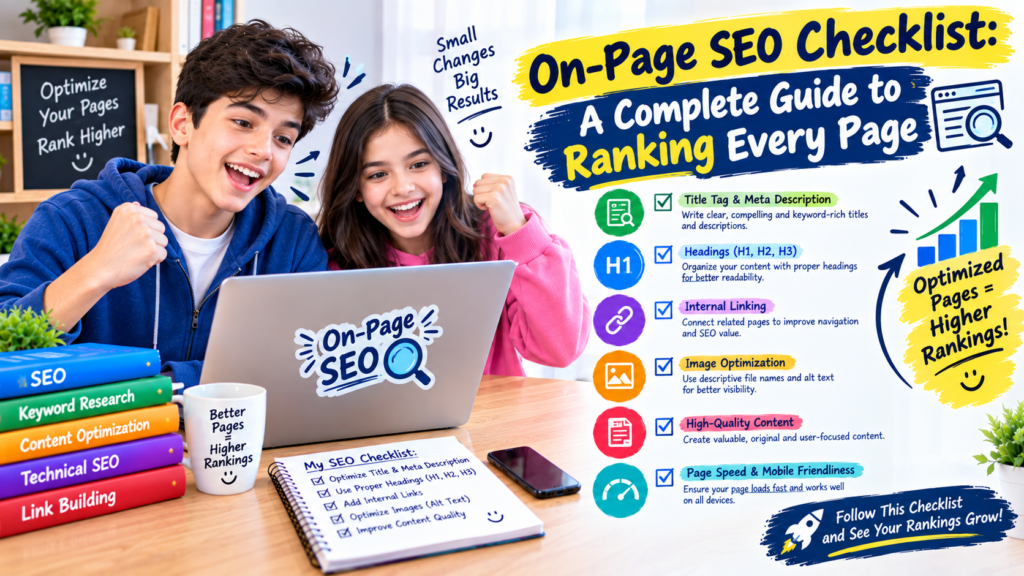
On-Page SEO Checklist: Quick Summary
We’ve now covered each element in detail. Here is a quick summary you can follow before publishing every page:
- Keyword research is complete and the primary keyword is clear.
- The title tag includes the keyword and is between 50-60 characters.
- The meta description is compelling and within 150-160 characters.
- The URL is short, descriptive, and keyword-rich.
- Only one H1 tag is used, and content is structured with H2 and H3.
- The content is comprehensive, original, and written to match user intent.
- Images are optimized, with small file sizes and alt text.
- Internal links point to relevant pages with descriptive anchor text.
- External links go only to authoritative sources.
- Content formatting is clean, with short paragraphs and bullet points.
- The page is fast and mobile-friendly.
- Relevant schema markup has been added.
- If possible, the content is also optimized for a featured snippet.
Common On-Page SEO Mistakes to Avoid
Along with building a good checklist, it’s also important to avoid some common mistakes.
- Keyword Stuffing: Many people force the keyword into the content repeatedly, which makes the content feel unnatural, and Google may even consider it spam.
- Duplicate Content: Publishing the same content on multiple pages confuses Google and hurts rankings.
- Thin Content: Very short, superficial content with no real value is very hard to rank in today’s competitive SEO landscape.
- Missing Alt Text: Not adding alt text to images is a common mistake that affects both accessibility and SEO.
- Ignoring Slow Page Speed: Many website owners focus on content but ignore technical performance, which ultimately hurts rankings.
- Non-Mobile-Friendly Design: In today’s mobile-first world, if your website doesn’t work well on mobile, that’s a big SEO mistake.
- Irrelevant Internal and External Links: Linking to irrelevant pages just to increase link count ruins user experience and reduces SEO value.
Auditing On-Page SEO Regularly
On-page SEO is not a one-time task. Even after publishing, regular audits are necessary.
Every few months, review your top pages and see whether there is room for improvement. You can add new keywords, updated statistics, or better formatting. Use Google Search Console to see which keywords are bringing traffic, and refine your content based on that data.
Also check competitor pages periodically, because if they are updating their content, you’ll need to update yours too to stay competitive.
Content Length and On-Page SEO
Many people ask what the ideal length of a page or blog post should be. The truth is that there is no single fixed number that works in every situation, because it depends on the topic, search intent, and competition.
For simple, quick-answer queries, short content (500-800 words) may be enough. But if you’re targeting a competitive, informational keyword where users want detailed guidance, you may need to write comprehensive content of 2,000 words or more.
The best way to decide content length is to analyze the top-ranking pages. See how much detail they cover the topic in, and try to make your content better and more comprehensive. But remember not to add unnecessary filler just to increase word count. Quality is always more important than quantity.
Common Title Tag and Meta Description Mistakes
Many websites don’t optimize their title tags and meta descriptions properly, which is a big missed opportunity. Here are some common mistakes to avoid.
- Using the Same Title on All Pages: Many websites, especially e-commerce or large sites, mistakenly use the same or very similar title tags on multiple pages. This confuses Google and causes pages to compete with each other.
- Leaving the Meta Description Empty: If you don’t write a meta description, Google picks a portion of the content itself to show in search results, which is often not as compelling as what you could write yourself.
- Writing Clickbait Titles: A title that doesn’t match the content may bring clicks in the short term, but it increases bounce rate and reduces user trust, which hurts SEO in the long run.
- Keyword Stuffing in Titles: Repeating the same keyword in the title, like “Best Shoes | Buy Shoes Online | Cheap Shoes | Shoes Sale,” not only looks unprofessional but Google may also consider it spam.
E-A-T and On-Page Trust Signals
In its content quality guidelines, Google places great emphasis on E-A-T (Expertise, Authoritativeness, Trustworthiness), especially for topics that affect users’ health, finances, or safety. Some trust signals can be added at the on-page level.
- Add an Author Bio: If the content was written by an expert, add their name and a short bio mentioning their qualifications or experience.
- Provide Sources and References: Wherever you use facts or statistics, link to their authoritative sources, as this increases the content’s credibility.
- Contact Information and About Page: Make sure your website has a clear “About Us” page and contact information available, as this builds trust.
- Show Publish and Update Dates: Show the publish date alongside the content and, if it has been updated, the update date too, so users know how recent the information is.
On-Page Optimization for Voice Search
As voice search assistants become more popular, some adjustments to on-page SEO have become necessary.
- Use Conversational Language: Voice searches are often made in a natural, conversational way, like “what are the best running shoes” rather than just “best running shoes.” Include natural phrases like these in your content too.
- Create Question-Based Headings: Voice search queries are often in the form of questions. Use common questions as headings in your content and give clear answers to them.
- Target Local Queries: Many voice searches have local intent, like “where is a good restaurant near me.” If your business is local, be sure to include location-specific information in your content.
On-Page SEO for Different Types of Pages
Each type of page needs a slightly different on-page SEO approach.
- Homepage: Your business or website’s main value proposition should be clear on the homepage. Include main service or product keywords along with brand keywords.
- Blog Posts: For blog posts, target informational keywords and write comprehensive, well-researched content that fully answers the user’s question.
- Product Pages: Product pages should have unique descriptions, clear images, pricing, and reviews. Target transactional keywords.
- Category Pages: On category pages, organize products with a short, useful description, and include relevant keywords naturally.
- Landing Pages: Landing pages, usually created for a specific campaign, should have a clear call-to-action and focused messaging, along with the target keyword clearly included.
On-Page SEO Tools That Can Help
Some tools are very useful for implementing on-page SEO effectively.
- Yoast SEO or Rank Math: If you use WordPress, these plugins tell you in real time whether your content is SEO-friendly and what improvements can be made.
- Google Search Console: This free tool tells you how your pages are performing in Google, which keywords are bringing traffic, and whether there are any indexing issues.
- Google PageSpeed Insights: With this you can check your page’s loading speed and get specific suggestions for improvement.
- Screaming Frog: This tool crawls your entire website and helps identify on-page issues, such as missing meta descriptions or duplicate titles.
- Google Rich Results Test: With this you can test your schema markup and see whether it has been implemented correctly.
Conclusion
On-page SEO is a detailed and multi-faceted process, but if you follow a systematic checklist, it becomes quite manageable. From title tags to content quality, from images to internal linking, every element is important in its own place and contributes to overall SEO performance.
Remember, the ultimate goal of on-page SEO is not just to please search engines, but to give users the best possible experience. When you optimize your content so that it is genuinely valuable to users, search engines automatically reward it.
The next time you publish a new page or blog post, keep this checklist in front of you and check each element carefully. At first this process may feel a bit time-consuming, but with practice it will become a habit, and both the quality and the SEO performance of every page will improve.